Fortnite · Windows / Overwolf
Fortmapp
Track and review your Fortnite routes.
A Fortnite interactive map with live route tracking, location-based match stats and map-based replays. Review where you moved and how the match unfolded.
Official Overwolf installer. Requires a Windows PC.
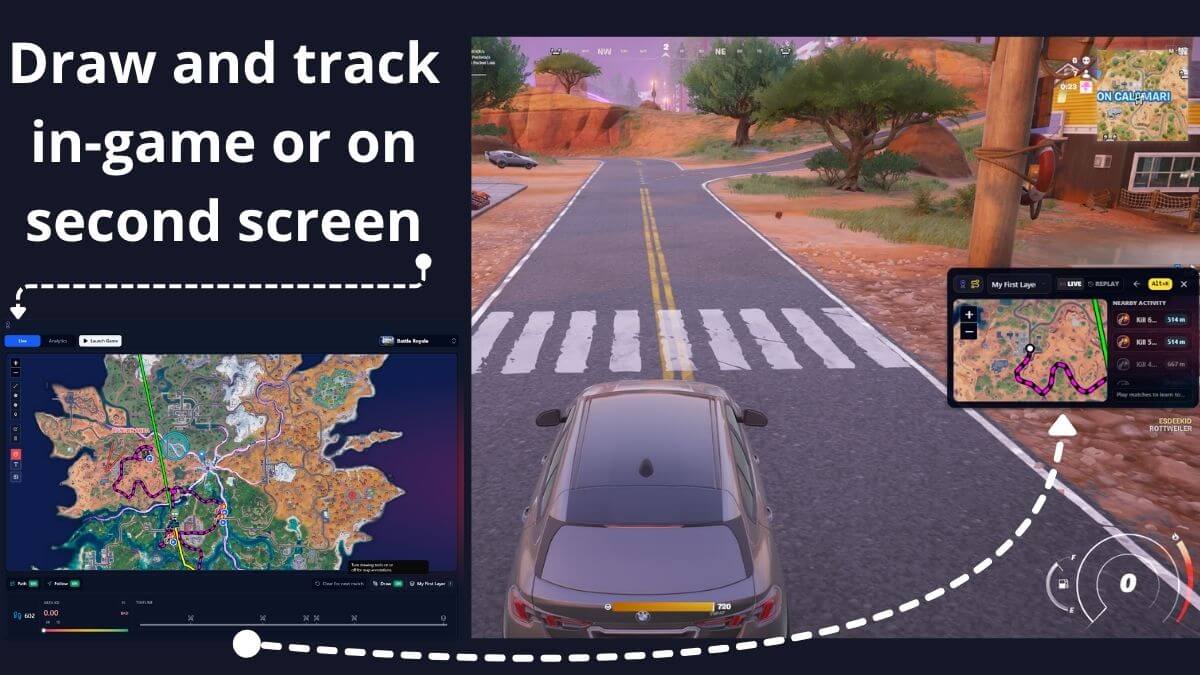
See your match on the map.
Follow the live route
Track movement on an interactive Fortnite map during a match, in-game or on a second screen.
Review the route after
Use map-based replays to revisit movement and see how a match unfolded across the island.
Compare places, not just totals
Read location-based match stats to connect results with the places you land, move through and fight.
Before you install.
- Game
- Fortnite
- Platform
- Windows, with Overwolf
- Developer
- Albérico Dias Barreto Filho
- Distribution
- Official Overwolf listing
- Releases & support
- See the Overwolf listing for current details.
About Fortmapp.
Does Fortmapp track routes during a match?
Yes. Fortmapp provides live route tracking on an interactive Fortnite map, including an in-game view and a second-screen workflow.
Is a map replay the same as a video replay?
No. A map-based replay is a way to review a match geographically. Do not assume it is a full video recording or Fortnite’s native replay file.
Can I compare how I play in different locations?
Fortmapp includes location-based match stats, so you can relate match results to places on the map.
Does the map always look like this screenshot?
The screenshot demonstrates the app’s map and route workflow. Fortnite maps change between seasons; the image is not a promise of the current island layout.
Get Fortmapp.
Install through Overwolf and open the app on your Windows PC.