Roblox · Windows / Overwolf
Roblox
Backpack Tracker
Your Backpacks, across Roblox accounts.
Organize Roblox Backpacks across Experiences and accounts. Add items with Quick Add, record your own values, and keep Archive and value history in one place.
Official Overwolf installer. Requires a Windows PC.
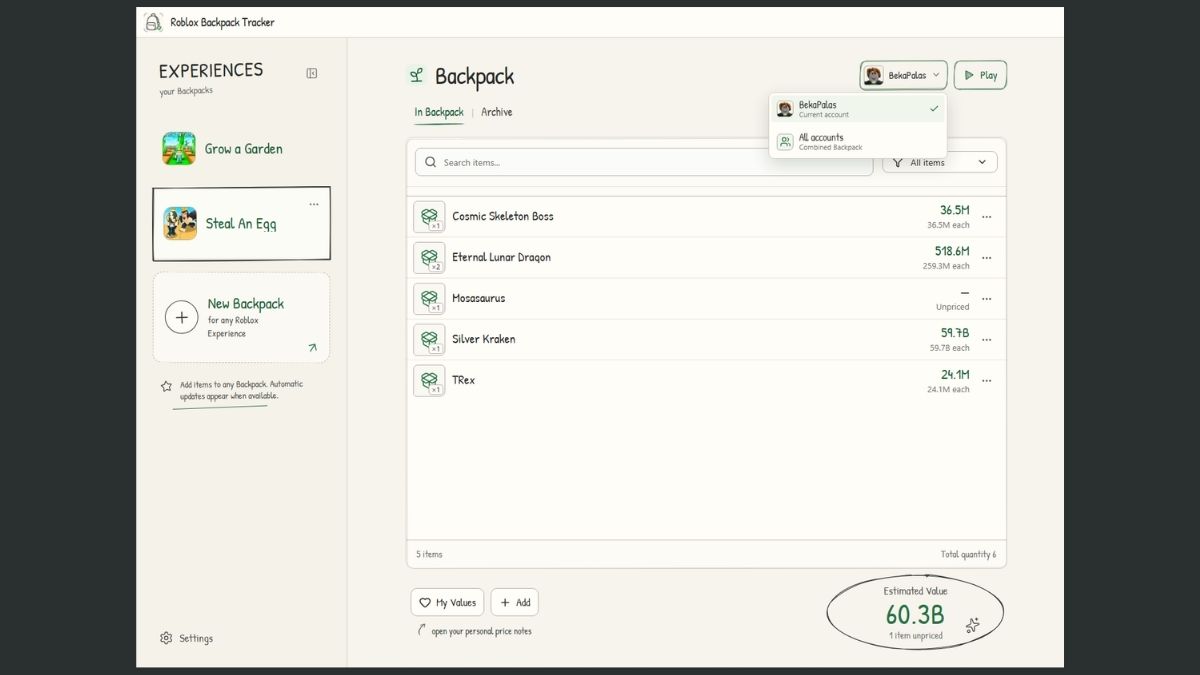
Keep items, accounts and values together.
Organize by Experience
Start a Backpack for a Roblox Experience and use Quick Add to record items. Keep separate collections in one app.
Switch accounts, keep context
View a single account or use All Accounts to see a combined Backpack across your accounts.
Keep your own value history
Use My Values for personal price notes. Archive items and review history as your collection changes.
Before you install.
- Game
- Roblox
- Platform
- Windows, with Overwolf
- Developer
- Albérico Dias Barreto Filho
- Distribution
- Official Overwolf listing
- Releases & support
- See the Overwolf listing for current details.
About Roblox Backpack Tracker.
Does it automatically sync every Roblox inventory?
No. Quick Add and manual organization are the dependable baseline. Do not assume an Experience has automatic tracking just because it appears in the app.
Are My Values official market prices?
No. My Values holds your personal price notes. Backpack totals reflect those notes and your recorded items; they are not verified market prices or trade offers.
Does it support multiple accounts?
Yes. You can organize Backpacks by account and use All Accounts for a combined view.
Can I use it across Roblox Experiences?
Yes. You can start Backpacks for different Experiences and record items manually. A dedicated automatic integration is not required for manual organization.
Get Roblox Backpack Tracker.
Install through Overwolf and open the app on your Windows PC.