Marvel Rivals · Windows / Overwolf
DeepRivals
Hero-switch context for Marvel Rivals.
Live overlays, hero-switch recommendations and matchup context for Marvel Rivals. Review your matches, highlights and decisions after the game.
Official Overwolf installer. Requires a Windows PC.
Know what changed. Decide what to play.
Read the live match
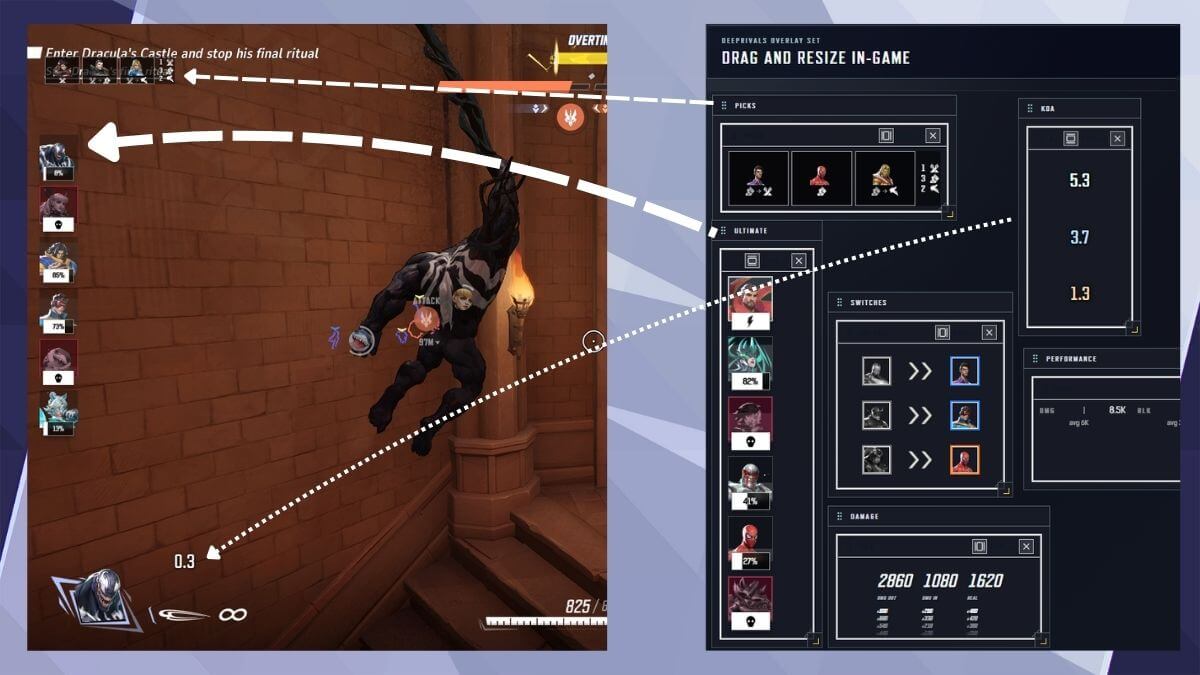
Keep hero picks, switches, team state and performance context in view with live overlays.
Consider a hero switch
Use recommendations and matchup context to weigh a change. The final call stays with you.
Review what happened
Return to match history, contextual highlights and post-game analysis to review the moments behind a result.
Context beside the game.
The overlay set brings picks, ultimate status, switches and performance into separate panels. You can move and resize the overlays to fit your view.
Before you install.
- Game
- Marvel Rivals
- Platform
- Windows, with Overwolf
- Developer
- Albérico Dias Barreto Filho
- Distribution
- Official Overwolf listing
- Releases & support
- See the Overwolf listing for current details.
About DeepRivals.
Does DeepRivals recommend when to switch heroes?
DeepRivals provides hero-switch recommendations using the match context available to the app. Treat a recommendation as decision support: your role, coordination and comfort with a hero still matter.
Is it only a post-match stats app?
No. DeepRivals combines live overlays and hero-switch context with match history, matchup analysis, contextual highlights and post-game review.
Can I use a second screen?
DeepRivals includes a live dashboard that can sit beside the game, as well as overlays for the game itself.
Does it guarantee a better result?
No. A recommendation reflects available context, not a guaranteed outcome. You remain responsible for the decision and the play.
Get DeepRivals.
Install through Overwolf and open the app on your Windows PC.