DeepRivals / Marvel Rivals guide
When should you switch heroes in Marvel Rivals?
A hero recommendation is a reason to reassess the match. It is not a command to swap. DeepRivals brings live match context and hero-switch recommendations into view so you can make that decision with more information.
Start with the problem you are trying to solve
Before changing heroes, name the problem: are you struggling to contribute in the current matchup, is the team missing something, or has the opposing lineup changed? A different hero is useful only if the change addresses a specific problem you can act on.
Separate a difficult fight from a repeated pattern. One lost engagement does not, by itself, tell you that your hero is the issue. Team positioning, timing and coordination still need your judgment.
What DeepRivals adds to that decision
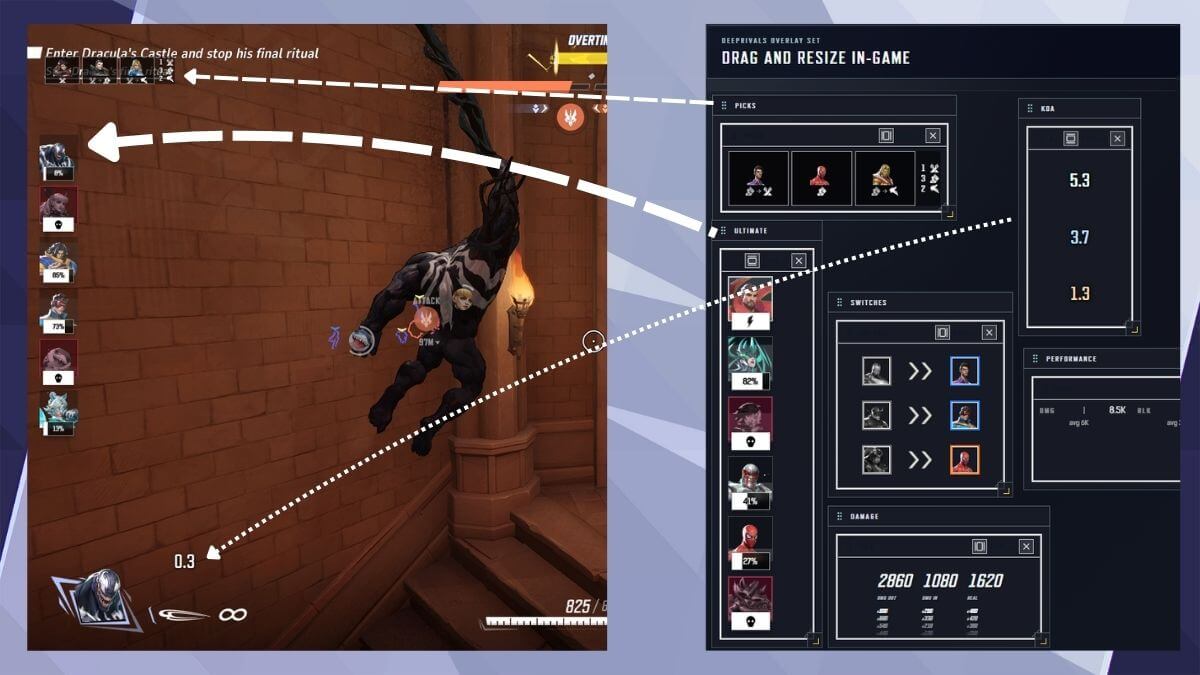
DeepRivals combines hero-switch recommendations, matchup context and live overlays. Its overlay set includes Picks, Ultimate, Switches and performance panels. These help keep available match information beside the game while you assess a change.
- Hero picks and switches: notice changes in the match rather than reasoning only from the opening lineup.
- Matchup context: consider how the current matchup affects the problem you are trying to solve.
- Performance context: use the available evidence to ask a better question about your contribution, rather than treating one number as a verdict.
The app supports your decision. This guide does not claim that its recommendations account for every tactical factor or reveal information the app cannot access.
Read the real overlay example
In the screenshot below, the Picks panel is separate from Switches, Ultimate and performance. That separation matters: a change of hero and a change in performance are different pieces of evidence. Look at them together rather than treating either as a complete explanation.
A practical hero-switch check
- State the issue. What is happening repeatedly that a different hero might address?
- Check the live context. Review the recommendation, matchups and recent switches available in DeepRivals.
- Consider your team and your own comfort. Can you play the suggested alternative effectively, and does the change fit what the team needs?
- Choose deliberately. A recommendation can lead to a switch, or to keeping your hero while changing how you play.
These are player decision steps, not a description of an undocumented recommendation formula.
Review the decision after the game
Use match history, contextual highlights and post-game review to revisit the moment. Ask what changed after the decision and whether the original problem improved. Matchup analysis gives another view of the context; it is not proof that a single switch caused a win or loss.
Repeated review is more informative than judging every decision only by the final match result.
Is DeepRivals the right tool for this?
It is a fit if you want Marvel Rivals hero recommendations and live context alongside a way to review matches later. It is a Windows companion app distributed through Overwolf. It is not an automated player, and it does not promise a winning pick for every situation.
For the complete feature overview and installation details, visit the DeepRivals product page.