Counter-Strike 2 · Windows / Overwolf
Economy Tool
Plan CS2 buys and safe drops.
A CS2 economy overlay for Full Buy, Force Buy and Eco decisions. See safe drops, set a reserve buffer and read enemy economy estimates in match context.
Official Overwolf installer. Requires a Windows PC.
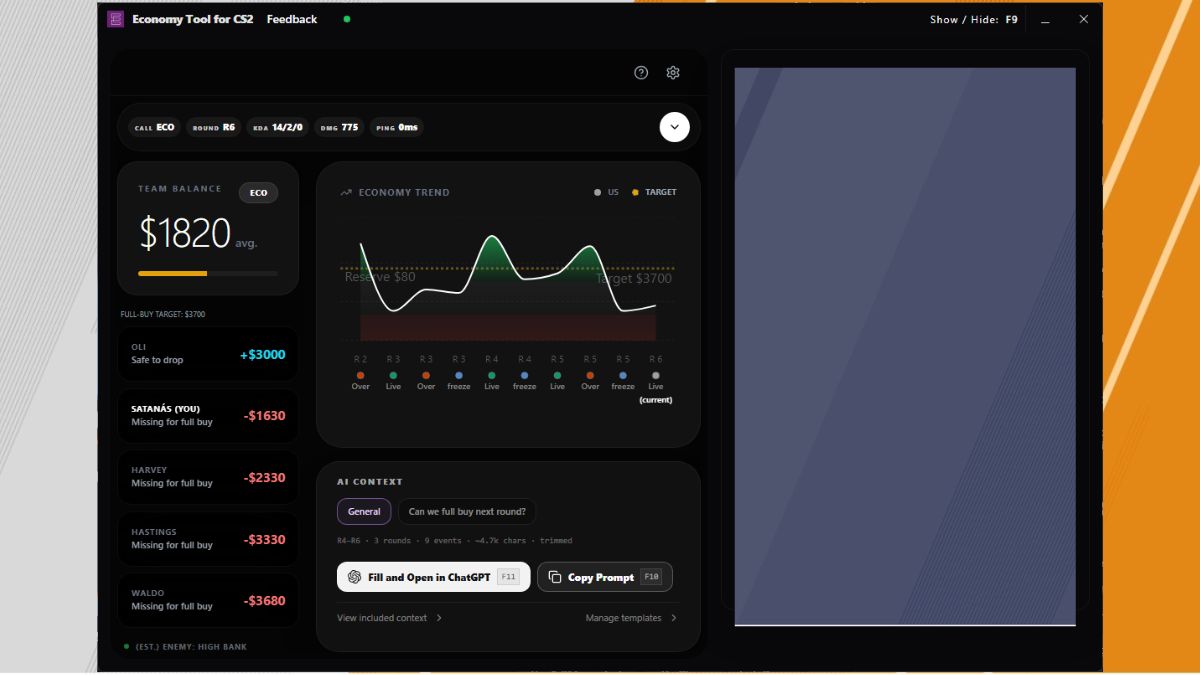
Make the team buy make sense.
Read the team buy
See Full Buy, Force Buy or Eco context alongside the team balance and economy trend.
Find a safe drop
See who has room to drop and who is short for a full buy. Use a reserve buffer to keep your plan in view.
Put estimates in context
Read enemy economy estimates alongside round evidence. Use match context to discuss a buy with your team.
Before you install.
- Game
- Counter-Strike 2
- Platform
- Windows, with Overwolf
- Developer
- Albérico Dias Barreto Filho
- Distribution
- Official Overwolf listing
- Releases & support
- See the Overwolf listing for current details.
About Economy Tool.
Is this a calculator I can use in my browser?
No. Economy Tool is a Windows app distributed through Overwolf. Its economy overlay works with CS2 match context; this website explains it and links to the official installer.
What does safe to drop mean?
It is the amount the app indicates a player can spend on drops after accounting for the configured buy needs and reserve. Read it together with the team buy call and the current round.
Does it know the exact enemy balance?
No. Enemy economy is an estimate based on available round evidence. It should not be read as an exact view of opponents’ money.
Can I adjust the reserve buffer?
Yes. The reserve buffer lets you retain money in the calculation instead of treating all available cash as spendable on drops.
Get Economy Tool.
Install through Overwolf and open the app on your Windows PC.