Economy Tool / CS2 guide
How to read a safe drop in CS2
A player can have money to drop while the team still needs an Eco. Economy Tool puts individual safe-drop amounts beside team economy, so you can read both before buying.
This is a guide to the Economy Tool Windows app. It is not an interactive browser calculator. The app works with CS2 match context through Overwolf.
What does “safe to drop” mean?
The safe-drop amount indicates room to spend on a teammate after allowing for the buy needs and reserve used by the app. It answers an individual spending question. The Full Buy, Force Buy or Eco call answers a broader team question.
Use both. One well-funded player does not automatically give everyone a coordinated full buy.
What goes into the context?
- Current money: what is available to spend now.
- Side-specific buy needs: the planned buy depends on which side you are playing.
- Reserve buffer: money you choose to keep rather than spend on drops.
- Loss bonus and round context: information relevant to reading the team’s economy and future buying situation.
These inputs explain what to inspect. They are not a fixed formula you should apply independently of the app’s configuration or the current match.
A real example: an Eco with one available drop
The screenshot shows an Eco call and a team average balance of $1,820. One player is marked Safe to drop +$3,000, while the remaining players have full-buy shortfalls.
Those numbers are not contradictory. The positive amount belongs to one player; the team call reflects a wider situation. Read the shortfalls before assuming that one drop makes the whole team ready to buy.
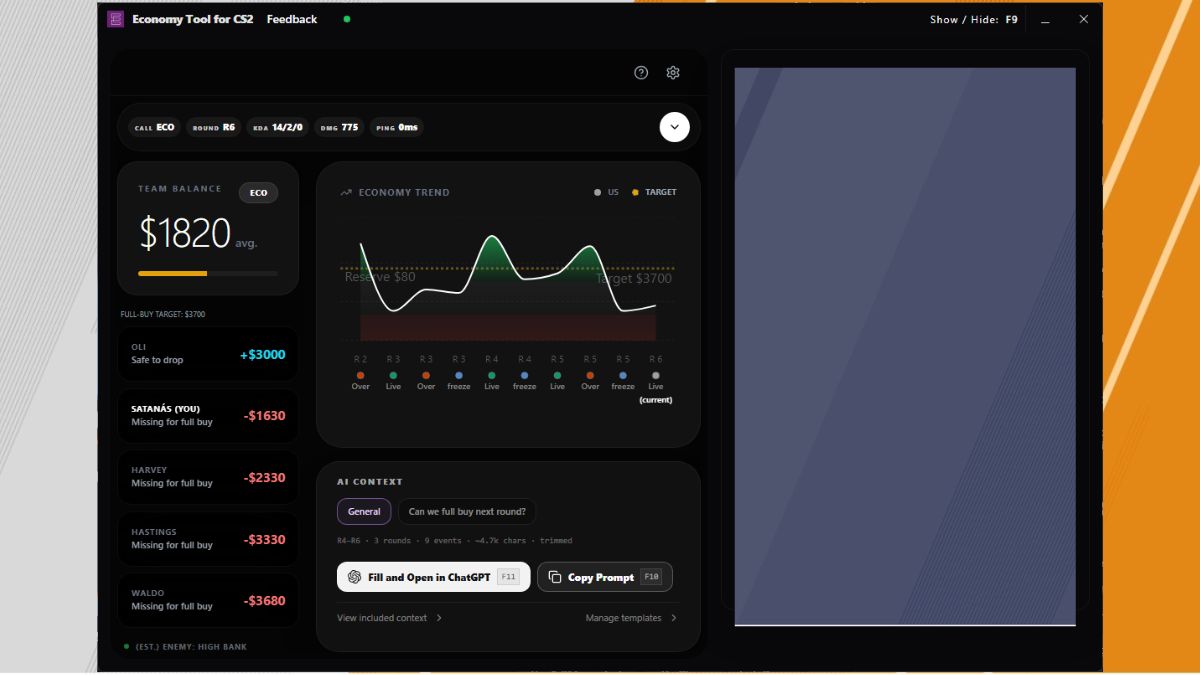
The image is an example from the official product listing, not a live calculation for your match. Its displayed targets and amounts are not universal CS2 buying thresholds.
Use the reserve buffer deliberately
The reserve buffer lets you retain money in the calculation. A larger reserve leaves less room to spend immediately. Check that the setting reflects your intended plan rather than assuming every spare dollar should become a drop.
Before buying, compare the indicated drop with the teammate’s actual need and the team’s agreed buy. The app provides context; the team still needs to coordinate.
Do not treat enemy economy as exact
Economy Tool estimates enemy economy from available round evidence. It does not expose an exact view of opponents’ money. Use that estimate as one part of match context, with uncertainty, rather than as a guaranteed prediction of their next buy.
A short pre-buy check
- Read the team call: Full Buy, Force Buy or Eco.
- Check individual full-buy shortfalls and available safe drops.
- Confirm that the reserve buffer matches the plan.
- Agree who buys and who drops before spending.
When is Economy Tool a useful fit?
Use it when you want a live CS2 economy overlay that keeps the team balance, individual drops and match context together. If you only want a one-off web calculation without installing an app, this is a different workflow.
See the Economy Tool product page for the feature overview and official Overwolf listing.